AfterShokz Open Comm headphone randomly mutes on Zoom calls
Problem
My Shokz Open Comm headset randomly mutes on Zoom calls.
Specs
- macOS Monterey 12.6
- MacBook Pro (16-inch, 2019)
- Connection Method: Bluetooth
- Headset: Shokz OpenComm Bone Conduction Stereo Bluetooth Headset
Solution
- Connect the headset to Mac via Bluetooth
- Launch Zoom & Open Zoom's Settings
- Select Audio
- Verify that the Speaker and Microphone are set to Shokz OpenComm headset
- Under Microphone, uncheck Automatically adjust microphone volume
- Restart Zoom
You are now good to go! 💪
| Zoom Setting Before | Zoom Setting After |
|---|---|
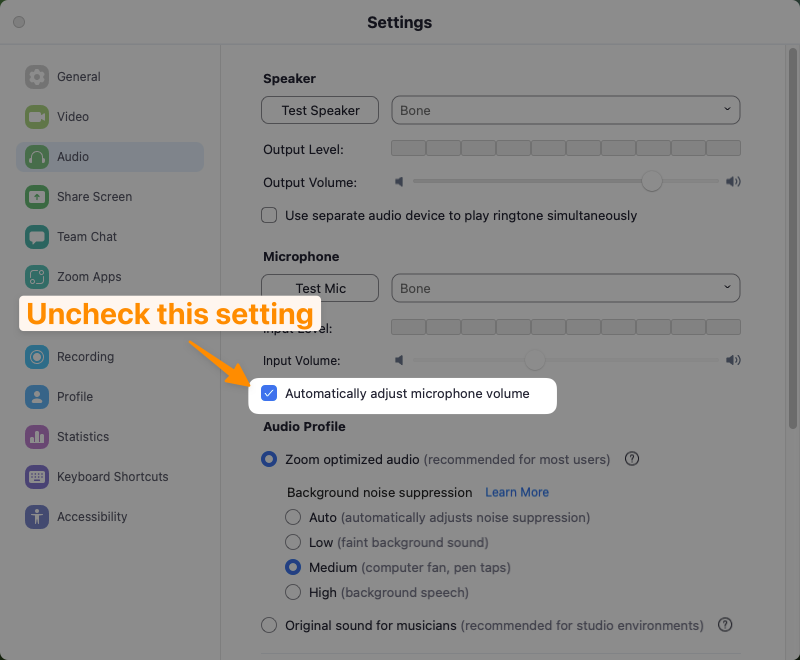 | 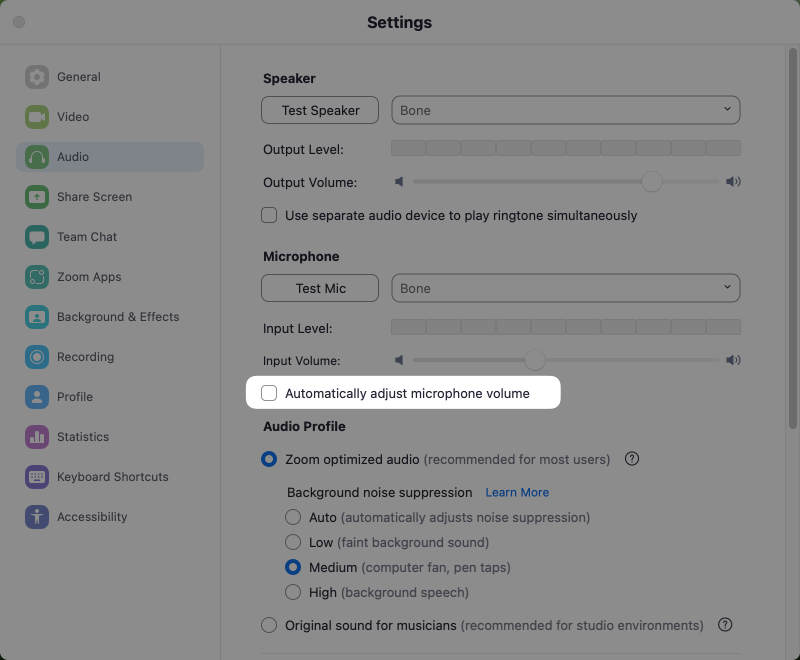 |
⚡ This is a known issue by Shokz. Macs, Zoom, and Shokz OpenComm headset often experience this problem. However, this issue is not present when using the headphones with other applications.
References
Needing help with Monterey and Aftershokz… - Apple Community