Delete User - Google Admin Console
UX copy for deleting a user in Google Admin Console, including modal text and confirmation email.
Table of contents
Delete User UX Copy Modal
Title
Delete user
Banner 1
Before deleting this user consider transferring their data. Once deleted, the user can't access their account and any untransferred data will be deleted after 20 days. Learn more about deleting users
Banner 2
Review data transfer steps below. If you need more time you can first reset the user's password or suspend their account to prevent them from accessing their account. Learn about suspending accounts
Transfer user's data
Data in Gmail
- Migrate the user's existing email
- If you want to keep receiving future emails sent to this address, here are your options:
- Reuse this users email address (Recommended)
You can make this user's current email address an alternate email (email alias) for another user 24 hours after this user is deleted.
Learn about reusing emails - Set up email forwarding for incoming messages
- Reuse this users email address (Recommended)
Data in Classroom
Make sure to transfer ownership of Google Classroom classes owned by this user using the Classroom API.
Doing so ensures that the class content remains available to your organization.
Learn more about transferring ownership of a class.
Data in other apps
- Select the user you want to transfer {user_full_name}'s data to (for example, a manager)
- Select data to transfer:
Footer banner
All data not transferred will be deleted, including YouTube data.
Learn about what's deleted
Footer
Once you delete this user their license will be removed.
CTA buttons
- [CANCEL]
- [DELETE USER]
Screenshot
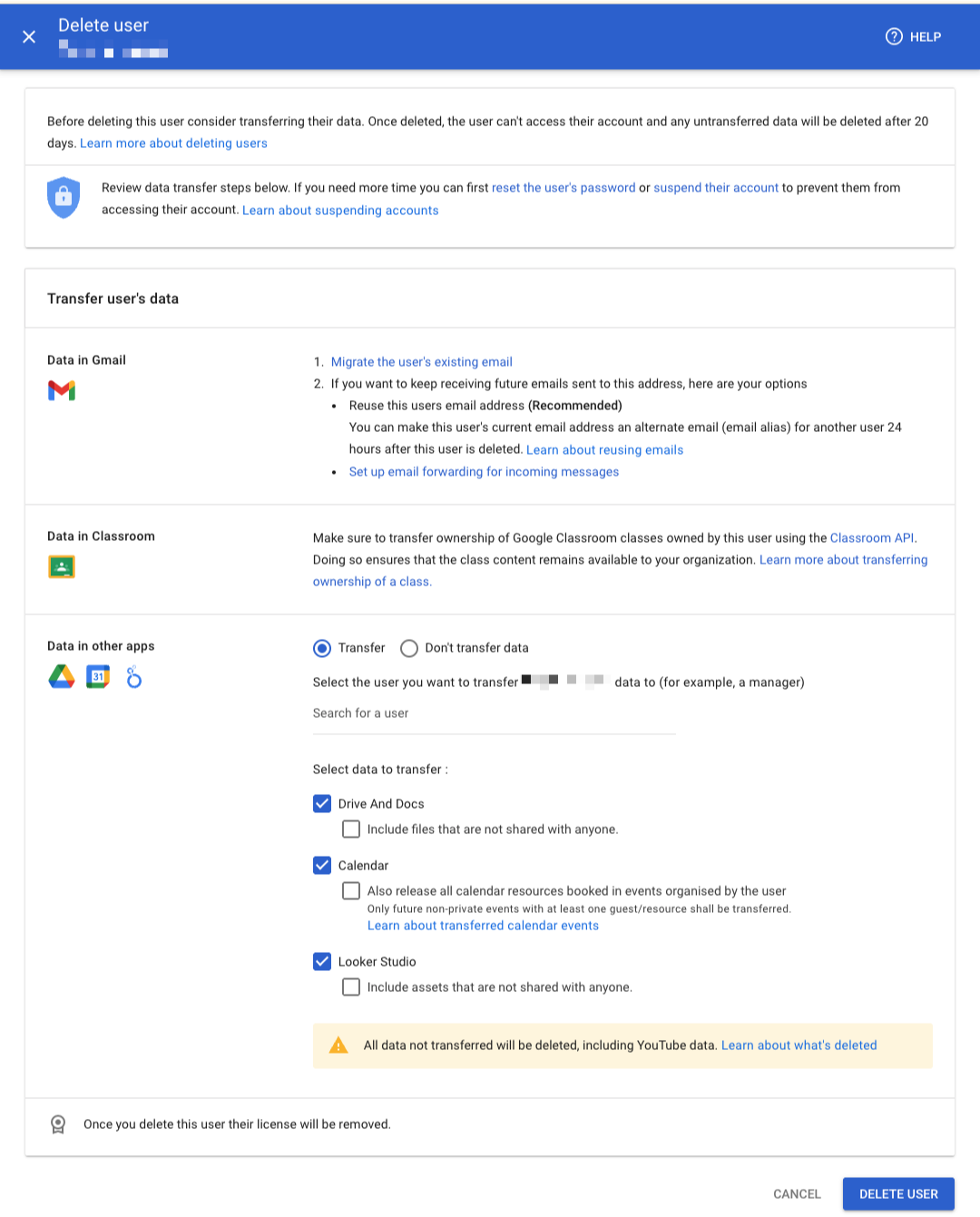
Confirmation modal
Title
Deleting user
Body
This user's data is being transferred. You'll get an email when that's complete, and the user is deleted.
When the transfer is still in progress, the user's account will be suspended to prevent them from accessing their account.
After the deletion you have 20 days to restore the account, after which all the data be permanently deleted. Learn more
Confirmation email
Subject line:
Your deletion of {user_full_name} from Google Workspace was successful
Body:
![Google Workspace] logo
Hello Admin,
Google Workspace recently processed a request from {admin_user_name} ({admin_user_email_address}) to delete {user_full_name} ({user_email_address}) and transfer their data to {admin_user_name} ({admin_user_email_address}).
The data transfer was successful and {user_full_name} ({user_email_address}) was deleted.
Sincerely,The Google Workspace Team
Footer:
Google Workspace © 2025 Google LLC 1600 Amphitheatre Parkway, Mountain View, CA 94043
You're receiving this mandatory email service announcement to update you about important changes to your Google Workspace product or account.