Export a Garoon event to Apple Calendar with a bookmarklet
A bookmarklet that turns the open Garoon event into an iCal file you can import into Apple Calendar, with a full breakdown of the code.
Copying and pasting event details from Garoon into Apple Calendar is tedious. This bookmarklet generates an iCal file from any open Garoon event, so the event details carry over in one click.
The file is built inside the browser, so the event subject and memo never leave the page.
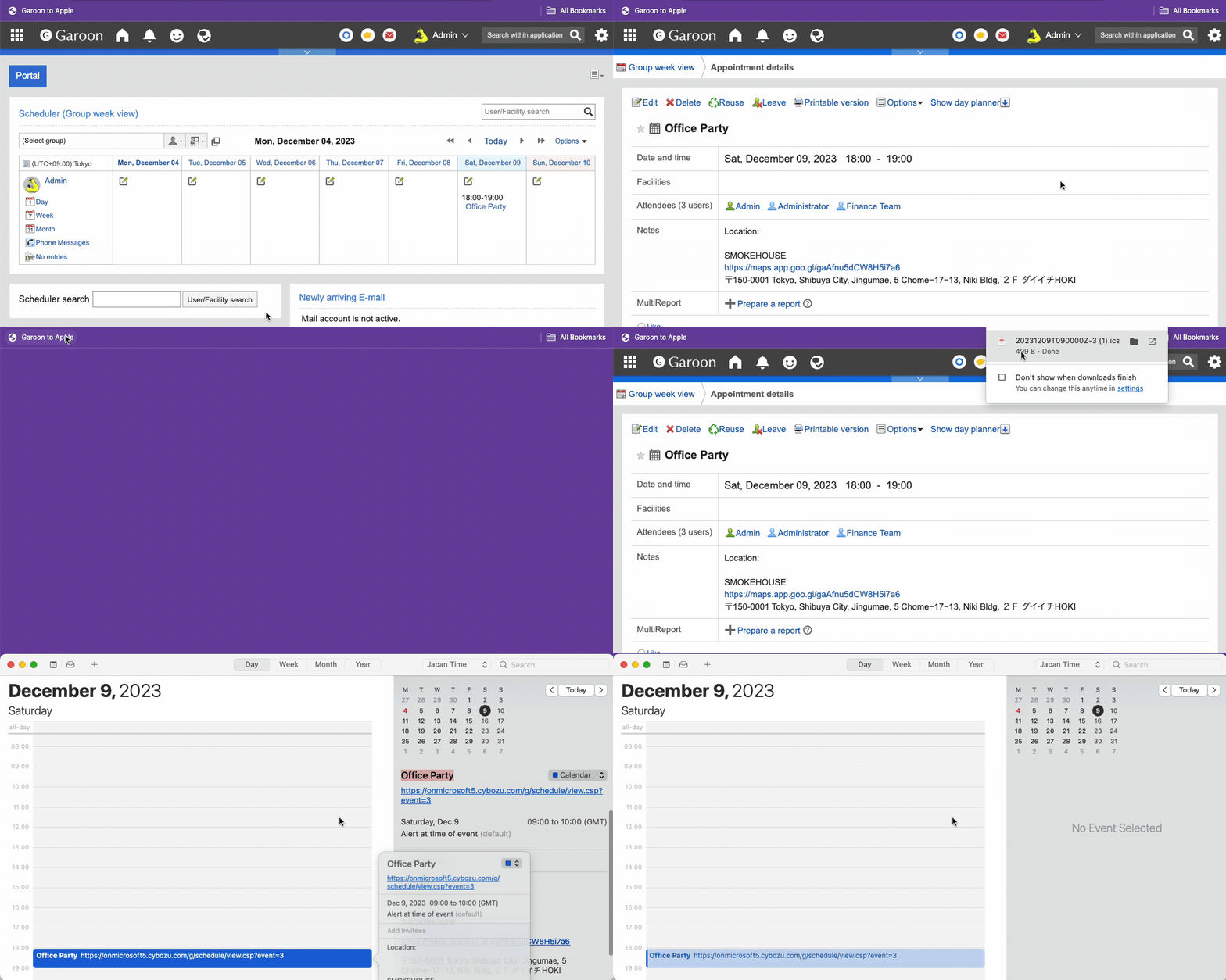
Usage
Initial setup
- Copy the bookmarklet code below.
- Enter
@bookmarksin Chrome's address bar. - Click the
⋮icon at the top-right corner. - Click Add new bookmark and paste the code into the URL field.
Note
The code uses block comments so that it still runs if the browser strips the line breaks while you paste it into the URL field.
Export a Garoon event to Apple Calendar
- Open the Garoon event's page.
- Click the bookmarklet.
- Open the downloaded
garoon-<event ID>.icsfile and confirm that the event is now in the Apple Calendar app.
The bookmarklet builds the file and starts the download immediately, without opening a new tab.
Troubleshooting
If the export fails, the bookmarklet shows an alert:
- "Error: Not on a Garoon event." - The page is not a Garoon event page, or the event has no start time. Open a specific event and click the bookmarklet again.
- "Error: Could not build the iCal file." - The event object was read, but building the file failed. The alert includes the error message.
If no alert appears and no file downloads, check the browser console for the logged event object and the generated iCal text:
- Open the browser console.
- Mac:
Command+Option+C - Windows, Linux, and Chrome OS:
Control+Shift+C
- Mac:
- Read the logged
eventobject and theicsstring.
Bookmarklet code
javascript: (() => {
  /* Escape a TEXT value per RFC 5545 3.3.11. */
  const escapeText = (input) =>
    String(input ?? '')
      .replace(/\\/g, '\\\\')
      .replace(/;/g, '\\;')
      .replace(/,/g, '\\,')
      .replace(/\r\n|[\r\n]/g, '\\n');

  /* UTC date-time form, e.g. 20260820T053000Z. No VTIMEZONE block needed. */
  const utcStamp = (value) =>
    new Date(value)
      .toISOString()
      .replace(/[-:]/g, '')
      .replace(/\.\d{3}/, '');

  /* Calendar date form, taken from the RFC 3339 string so no time zone math applies. */
  const dateStamp = (dateTime) =>
    String(dateTime).slice(0, 10).replace(/-/g, '');

  /* DTEND is exclusive for all-day events, so advance one day. */
  const dayAfter = (yyyymmdd) =>
    new Date(
      Date.UTC(
        Number(yyyymmdd.slice(0, 4)),
        Number(yyyymmdd.slice(4, 6)) - 1,
        Number(yyyymmdd.slice(6, 8)) + 1,
      ),
    )
      .toISOString()
      .slice(0, 10)
      .replace(/-/g, '');

  /* Fold content lines at 75 octets per RFC 5545 3.1, without splitting a
     multi-byte character or an escape sequence. */
  const foldLine = (line) => {
    const bytes = new TextEncoder().encode(line);
    if (bytes.length <= 75) return line;
    const decoder = new TextDecoder();
    const chunks = [];
    let cut = 0;
    let limit = 75;
    while (cut < bytes.length) {
      let end = Math.min(cut + limit, bytes.length);
      if (end < bytes.length) {
        while (end > cut + 1 && (bytes[end] & 0xc0) === 0x80) end--;
        let slashes = 0;
        while (bytes[end - 1 - slashes] === 0x5c) slashes++;
        if (slashes % 2 === 1) end--;
      }
      chunks.push(decoder.decode(bytes.slice(cut, end)));
      cut = end;
      limit = 74; /* continuation lines start with a space */
    }
    return chunks.join('\r\n ');
  };

  const buildIcs = (event, eventUrl, host) => {
    let dtStart;
    let dtEnd;
    if (event.isAllDay === true) {
      const endSource = event.end?.dateTime ?? event.start.dateTime;
      dtStart = `DTSTART;VALUE=DATE:${dateStamp(event.start.dateTime)}`;
      dtEnd = `DTEND;VALUE=DATE:${dayAfter(dateStamp(endSource))}`;
    } else {
      const start = new Date(event.start.dateTime);
      const end = event.end?.dateTime
        ? new Date(event.end.dateTime)
        : new Date(
            start.getTime() + 3600000,
          ); /* start-only events get one hour */
      dtStart = `DTSTART:${utcStamp(start)}`;
      dtEnd = `DTEND:${utcStamp(end)}`;
    }

    const rooms = (event.facilities ?? [])
      .map((facility) => facility.name)
      .join(', ');
    const now = new Date();

    const lines = [
      'BEGIN:VCALENDAR',
      'VERSION:2.0',
      'PRODID:-//tokyo-geek//garoon-to-apple//EN',
      'CALSCALE:GREGORIAN',
      'BEGIN:VEVENT',
      /* A stable UID lets a re-export update the event instead of duplicating it.
         Use the cleaned host so both access URLs produce the same UID. */
      `UID:garoon-${event.id}@${host}`,
      `DTSTAMP:${utcStamp(now)}`,
      /* A rising SEQUENCE tells Apple Calendar the re-export is the newer copy. */
      `SEQUENCE:${Math.floor(now.getTime() / 60000)}`,
      dtStart,
      dtEnd,
      `SUMMARY:${escapeText(event.subject)}`,
      /* The Garoon link belongs here and nowhere else. URL is a URI value, not
         TEXT, so it is not escaped, and it is kept out of DESCRIPTION so the
         memo stays the memo. */
      `URL:${eventUrl}`,
    ];
    if (event.notes) lines.push(`DESCRIPTION:${escapeText(event.notes)}`);
    if (rooms) lines.push(`LOCATION:${escapeText(rooms)}`);
    lines.push('END:VEVENT', 'END:VCALENDAR');

    return lines.map(foldLine).join('\r\n') + '\r\n';
  };

  const download = (ics, fileName) => {
    const blob = new Blob([ics], { type: 'text/calendar;charset=utf-8' });
    const objectUrl = URL.createObjectURL(blob);
    const anchor = document.createElement('a');
    anchor.href = objectUrl;
    anchor.download = fileName;
    document.body.append(anchor);
    anchor.click();
    anchor.remove();
    setTimeout(() => URL.revokeObjectURL(objectUrl), 10000);
  };

  try {
    const event = window.garoon?.schedule?.event?.get();

    if (!event?.start?.dateTime) {
      alert(
        `Error: Not on a Garoon event.\nPlease open a specific Garoon event.`,
      );
      return;
    }

    /* Client certificate authentication inserts ".s" into the host name. */
    const origin = location.origin.replace('.s.', '.');
    const eventUrl = `${origin}${location.pathname}?event=${event.id}`;
    const ics = buildIcs(
      event,
      eventUrl,
      location.hostname.replace('.s.', '.'),
    );

    console.log({ event, ics });
    download(ics, `garoon-${event.id}.ics`);
  } catch (error) {
    console.error(error);
    alert(`Error: Could not build the iCal file.\n${error.message}`);
  }
})();
What is a bookmarklet
A bookmarklet is a small piece of JavaScript code stored as a bookmark in a web browser.
Clicking it runs the code against the current web page, which makes it an easy way to extend the browser's functionality without installing an extension.
Code breakdown
Wrap the code in an IIFE
First, specify javascript as the language of the code.
Then, wrap the code in an immediately invoked function expression (IIFE). Bookmarklets run in the global scope, so the wrapper keeps the script's variables out of the page's global scope.
javascript: (() => {
  // ... (code snippet)
})();
Get the Garoon event object
Use the garoon.schedule.event.get() JavaScript API to get the event object of the open Garoon event.
The window web API makes the garoon object reachable from the global scope.
const event = window.garoon?.schedule?.event?.get();Verify the input
Before continuing, verify that the event has a start time.
const event = window.garoon?.schedule?.event?.get();

if (!event?.start?.dateTime) {
  alert(`Error: Not on a Garoon event.\nPlease open a specific Garoon event.`);
  return;
}
An earlier version compared the event against undefined, which passes when the value is null and fails later with a less useful error. The falsy check covers undefined and null in one condition.
Checking start.dateTime rather than the event itself also asserts the one field the rest of the script cannot work without. Every other field is optional, and the script falls back to a sensible default when a field is missing.
Modify the origin URL
Use location.origin to get the origin URL of the current page.
The client certificate authentication feature modifies the URL by adding a .s between the subdomain and the domain, so remove it before exporting.
const origin = location.origin.replace('.s.', '.');Construct the event URL
Generate a short, clean URL for the event by combining the origin URL with the event ID.
const url = `${origin}${location.pathname}?event=${event.id}`;Build the iCal text
An iCal file is plain text, so the browser can build one without calling any service. The format is defined by RFC 5545, and every line is a property written as NAME:value.
A single event needs a VCALENDAR wrapper around one VEVENT block.
const lines = [
  'BEGIN:VCALENDAR',
  'VERSION:2.0',
  'PRODID:-//tokyo-geek//garoon-to-apple//EN',
  'CALSCALE:GREGORIAN',
  'BEGIN:VEVENT',
  `UID:garoon-${event.id}@${host}`,
  `DTSTAMP:${utcStamp(now)}`,
  `SEQUENCE:${Math.floor(now.getTime() / 60000)}`,
  dtStart,
  dtEnd,
  `SUMMARY:${escapeText(event.subject)}`,
  `URL:${eventUrl}`,
];
if (event.notes) lines.push(`DESCRIPTION:${escapeText(event.notes)}`);
if (rooms) lines.push(`LOCATION:${escapeText(rooms)}`);
lines.push('END:VEVENT', 'END:VCALENDAR');

return lines.map(foldLine).join('\r\n') + '\r\n';
Two details in that last line matter:
- Lines are joined with
CRLF, not a bare newline. RFC 5545 section 3.1 requires it, and a strict parser rejects a file that usesLFalone. - Every line passes through
foldLinebefore it is joined, which is covered in Fold long lines.
Each value goes into the field it belongs in: the memo into DESCRIPTION, the meeting rooms into LOCATION, and the Garoon link into URL. Keeping the link out of the description matters because URL is a URI value rather than a TEXT value, so it is stored without escaping and Apple Calendar can show it as a real link instead of a line of text at the bottom of the memo.
The room names come from the event's facilities array, and the array is missing on an event with no room, so it defaults to an empty array.
const rooms = (event.facilities ?? [])
  .map((facility) => facility.name)
  .join(', ');
DESCRIPTION and LOCATION are pushed only when there is something to put in them, so an event with no memo and no room does not carry two empty properties.
Format the start and end times
Garoon returns an absolute RFC 3339 timestamp, such as 2026-08-20T14:30:00+09:00. Calling toISOString() converts it to the same instant in UTC, and stripping the separators leaves the iCal date-time form.
const utcStamp = (value) =>
  new Date(value)
    .toISOString()
    .replace(/[-:]/g, '')
    .replace(/\.\d{3}/, '');
A 14:30 Asia/Tokyo start becomes 20260820T053000Z. The trailing Z marks the value as UTC, which has exactly one meaning, so the file does not need a VTIMEZONE block. Apple Calendar converts the instant to the viewer's local time zone when it displays the event.
This is also why the file carries no time zone name. An earlier version sent a UTC timestamp and an Asia/Tokyo time zone parameter together, which is contradictory input: the timestamp is already absolute, so a second time zone can only be ignored or double-applied.
An event with no end time (isStartOnly) has no usable end.dateTime, so the script gives it a one-hour duration rather than exporting a zero-length event.
const end = event.end?.dateTime
  ? new Date(event.end.dateTime)
  : new Date(start.getTime() + 3600000);
Handle all-day events
An all-day event is not a timed event that happens to start at midnight. iCal has a separate form for it, and using the timed form instead is what made the earlier version export all-day events on the wrong day.
if (event.isAllDay === true) {
  const endSource = event.end?.dateTime ?? event.start.dateTime;
  dtStart = `DTSTART;VALUE=DATE:${dateStamp(event.start.dateTime)}`;
  dtEnd = `DTEND;VALUE=DATE:${dayAfter(dateStamp(endSource))}`;
}
Two rules apply here:
VALUE=DATEmarks the value as a calendar date with no time and no time zone, written as20260820.DTENDis exclusive, so a one-day event on August 20 ends on August 21. Without the extra day, Apple Calendar shows a zero-length event.
The date itself comes from slicing the RFC 3339 string rather than from a Date object.
const dateStamp = (dateTime) => String(dateTime).slice(0, 10).replace(/-/g, '');Garoon reports an all-day event as starting at 00:00:00 in the local time zone, per the schedule object documentation. Converting that midnight to UTC moves it to 15:00 on the previous day for a JST user, so any date arithmetic on the instant reintroduces the bug. Slicing the string takes the local date as written and avoids the conversion entirely.
Note
The Garoon documentation implies that the JavaScript API reports the end of an all-day event as 00:00:00 on the last day, while the REST API returns 23:59:59, and this has not been confirmed for a multi-day all-day event.
Escape the text values
RFC 5545 section 3.3.11 gives four characters a special meaning inside a TEXT value: the backslash, the semicolon, the comma, and the line break. Writing any of them literally corrupts the value, and an unescaped comma is the common case, because a parser reads it as the start of a second value and truncates the first.
const escapeText = (input) =>
  String(input ?? '')
    .replace(/\\/g, '\\\\')
    .replace(/;/g, '\\;')
    .replace(/,/g, '\\,')
    .replace(/\r\n|[\r\n]/g, '\\n');
The backslash is replaced first, so that the backslashes added by the later rules are not doubled again. Wrapping the input in String(input ?? "") means a missing subject or memo produces an empty value instead of throwing.
A memo written as:
Review the draft, then reply
Thanks
is written into the file as:
DESCRIPTION:Review the draft\, then reply\nThanksThe \n here is two characters, a backslash and a letter, not a line break. A real line break inside a value would end the property.
Fold long lines
RFC 5545 section 3.1 limits a content line to 75 octets, and splits anything longer across multiple lines. A continuation line starts with a single space, and a parser removes the CRLF and that space to rebuild the original value.
The limit counts octets, not characters. That distinction is not optional for Garoon, where subjects and memos are usually Japanese: one Japanese character is 3 bytes in UTF-8, so a 75-character line is 225 octets, three times over the limit. Counting bytes is what TextEncoder is for.
const bytes = new TextEncoder().encode(line);
if (bytes.length <= 75) return line;
Cutting a byte array has two hazards, and the loop guards against both:
- A cut in the middle of a multi-byte character produces two broken fragments. Continuation bytes in UTF-8 all start with the bits
10, so the cut moves back until it lands on the first byte of a character. - A cut between a backslash and the character it escapes splits an escape pair. Counting the backslashes immediately before the cut and moving back one when the count is odd keeps the pair together.
while (end > cut + 1 && (bytes[end] & 0xc0) === 0x80) end--;
let slashes = 0;
while (bytes[end - 1 - slashes] === 0x5c) slashes++;
if (slashes % 2 === 1) end--;
Continuation lines are cut at 74 octets rather than 75, because the leading space counts toward the limit.
A Japanese subject folds like this:
SUMMARY:定例ミーティング:第三四半期の進捗確認と来期
 の予算計画のレビュー
The first line is 74 octets: 8 for SUMMARY: and 66 for the 22 Japanese characters. One more character would put it at 77.
Give the event a stable UID
UID is how a calendar app decides whether an imported event is a new event or a new copy of one it already has. With a stable UID, Apple Calendar can recognize a re-export as the same event and update the existing entry instead of adding a copy. Without one, every export adds another duplicate.
`UID:garoon-${event.id}@${host}`,
`DTSTAMP:${utcStamp(now)}`,
`SEQUENCE:${Math.floor(now.getTime() / 60000)}`,
The host is the cleaned host name, with the .s. segment removed, so that both Garoon access URLs produce the same UID for the same event.
SEQUENCE is the revision number of the event, and it has to rise for an update to be accepted. Using the current time in minutes guarantees that the second export carries a higher number than the first.
Download the file
The finished text goes into a Blob, and URL.createObjectURL() turns that blob into a URL the page can link to.
const blob = new Blob([ics], { type: 'text/calendar;charset=utf-8' });
const objectUrl = URL.createObjectURL(blob);
const anchor = document.createElement('a');
anchor.href = objectUrl;
anchor.download = fileName;
document.body.append(anchor);
anchor.click();
anchor.remove();
setTimeout(() => URL.revokeObjectURL(objectUrl), 10000);
The download attribute tells the browser to save the target instead of navigating to it, and supplies the file name. The attribute is honored here because an object URL is same-origin with the page that created it.
No window is opened, so there is no popup blocker to fight, and the download starts without a second click.
An object URL holds its blob in memory until the document is discarded, so revokeObjectURL() releases it. The call is delayed to give the download time to start.
Log for debugging
To help with debugging, log the event object and the generated iCal text to the console, so that both the input and the output of the script are visible.
console.log({ event, ics });The whole script also runs inside a try block, so an unexpected event shape produces an alert and a logged stack trace rather than nothing at all.
} catch (error) {
  console.error(error);
  alert(`Error: Could not build the iCal file.\n${error.message}`);
}
v1 upgrade
The first version of this bookmarklet built a query string and handed it to calndr.link, a free service that returned an iCal file. That service is gone: the endpoint now redirects to AddCal and responds with an HTML landing page rather than a calendar file, and the documented replacement requires a Dynamic Link Key on a paid plan. The original code is kept as garoon-to-apple-bookmarklet-v0.js for reference.
Generating the file in the browser removes that dependency, and it also means the event subject, the memo, and the internal Garoon URL never leave the page. For a work calendar, where a memo can hold meeting notes, customer names, or a conference link, that is the more important half of the change.
Found this useful?
If you found this article or the bookmarklet useful, please consider buying me a coffee. ☕
References
- Schedule object - cybozu developer network
- Get the schedule event - cybozu developer network
- RFC 5545 - Internet calendaring and scheduling core object specification (iCalendar)
- Blob - MDN
- URL.createObjectURL() - MDN
- The download attribute - MDN
- TextEncoder - MDN
- garoon-to-apple-bookmarklet-v1.js - GitHub
- Originally published on DEV and Qiita.