What is Git & GitHub? – Basics & First Repo
🇯🇵 日本語版:01_Start.md
This section introduces you to Git and GitHub and goes over setting up your first repository.
Overview
- Git Basics
- GitHub Basics
- Hands-on section to create a repository
- Overview of common Git commands
Outline
- Overview
- What is Git?
- What is GitHub?
- Creating a Repository - Hands-on
- Overview of Basic Git Commands
- Hands-on A Review
- Quiz Time
- Next Section
What is Git?
- Git is a software development tool that provides version control.
- It started in 2005 as a tool to manage Linux kernel development.
- It is a free and open-source distributed version control system.
What is Version Control?
History ⌛
- It records the changes made over time.
Teamwork 💪
- It lets you collaborate with developers who use other systems.
Backup 💾
- It lets you restore a specific version later.
A save point in a game 📌
- “Version control” is similar to a checkpoint system in a game.
- When you clear a level, you save the current level of the game.
- After that, even if you make a mistake on the next level, you do not have to restart the whole game.
Examples of Version Control
| Google Docs | Kintone |
|---|---|
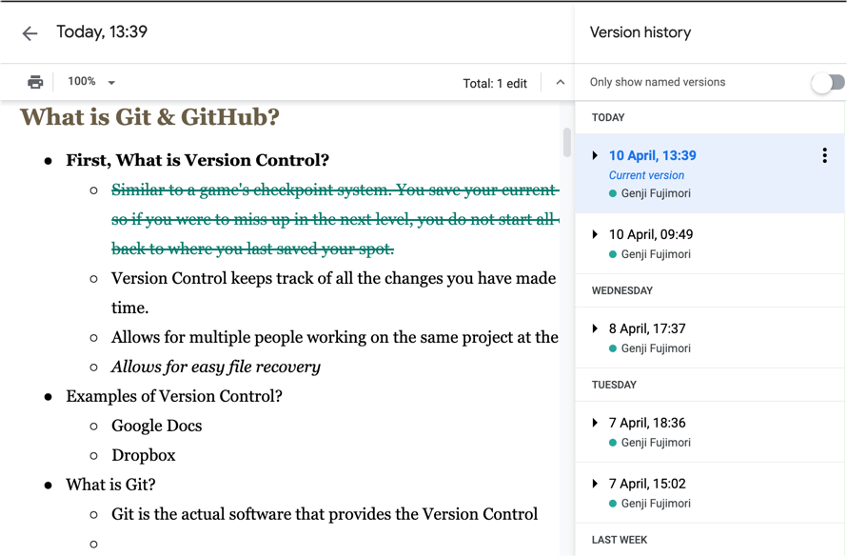 |
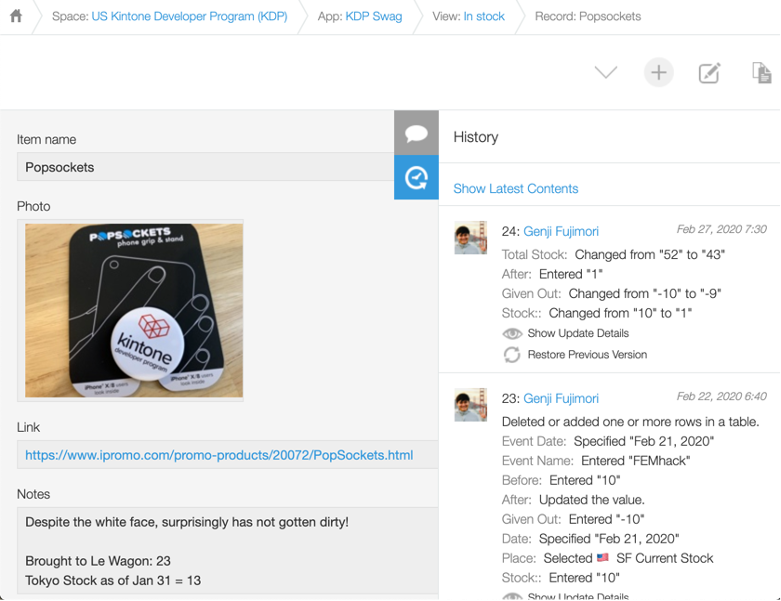 |
What is GitHub?
- GitHub is a collaborative development platform.
- It is a place where you can view and show code.
- Much like Google Docs, many people can view and edit code at the same time.
- When you hear
Remote repositories, think of GitHub.
- It was founded in 2008 and is now a subsidiary of Microsoft.
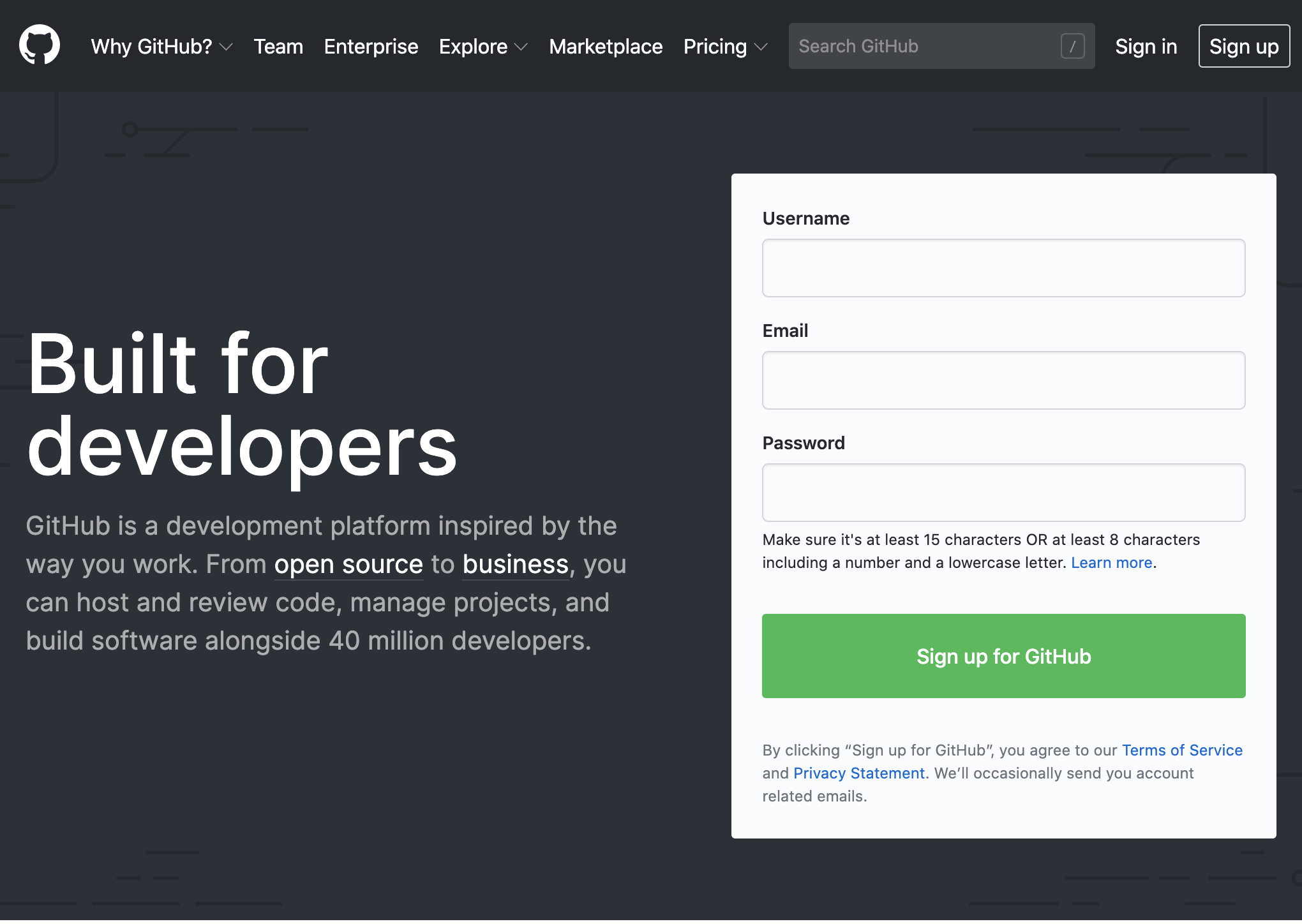 |
 |
GitHub Example - Apple
Apple has released a set of tools and resources for free to help app developers, such as password manager makers, generate strong passwords.
github.com/apple/password-manager-resources
Apple publishes free resources to improve password security - ZDNet
Creating a Repository - Hands-on
Local setup
- Create a folder.
- Configure the folder to be managed by Git.
GitHub setup
- Create something like a “folder” on GitHub.
- It is called a
Repository.
Connect the local folder with GitHub
- Configure the two so they are connected.
- Once you create a file locally and run Git commands, the file will appear on GitHub.
Create a Local Repository
⚠️ Make sure you have already completed the steps in the Prep Guide, Prep - 00_Prep_EN.md.
⚡ Where do you run the commands?
- Mac: Use the Terminal.
- Windows: Use the Command Prompt.
-
Move to an easy-to-reach folder and create a directory named
learning_git.cd Documents mkdir learning_git cd learning_git -
Use the
pwdcommand to confirm you are in the right place.pwd /Users/YourUserName/Documents/learning_git -
Initialize a Git repository with the
git initcommand.git init Initialized empty Git repository in /Users/YourUserName/Documents/learning_git/.git/
⚡ Repository is sometimes shortened to Repo.
Add a README.md File
-
Create a README.md file.
touch README.md -
Add a description of the repository to the README.md file.
vi README.md

# or

code README.md
# Learning JS Repo A repository for JavaScript lectures and assignments.
⚡ A README.md file is used to explain the purpose and usage of the software or the Git repository.
Confirm the Git Status
The git status command
- Shows the working directory and the staging area.
Changes to be committed: see which files have changes.Untracked files: see which files are not being tracked by Git.
Looking at the output, you can see that README.md needs to be tracked.
git status
On branch main
No commits yet
Untracked files:
  (use "git add <file>..." to include in what will be committed)
 README.md
nothing added to commit but untracked files present (use "git add" to track)
Add a File to the Staging Area
git add <file/folder>
- The command to add a file or folder to the staging area.
git add README.md
README.md now exists in the staging area.
git status
On branch main
No commits yet
Changes to be committed:
(use "git rm --cached <file>..." to unstage)
new file: README.md
Add a File to the Git Repository
git commit -m "message"
- The command to add a file or folder to the repository.
- Git - git-commit Documentation
README.md has been added to the repository!
- You can see that
README.mdwas added to themainbranch.
git commit -m "README file created"

git status
$ git commit -m "README file created"
[main (root-commit) 03098e7] README file created
 1 file changed, 3 insertions(+)
 create mode 100644 README.md

$ git status
On branch main
nothing to commit, working tree clean
Create a GitHub Repository
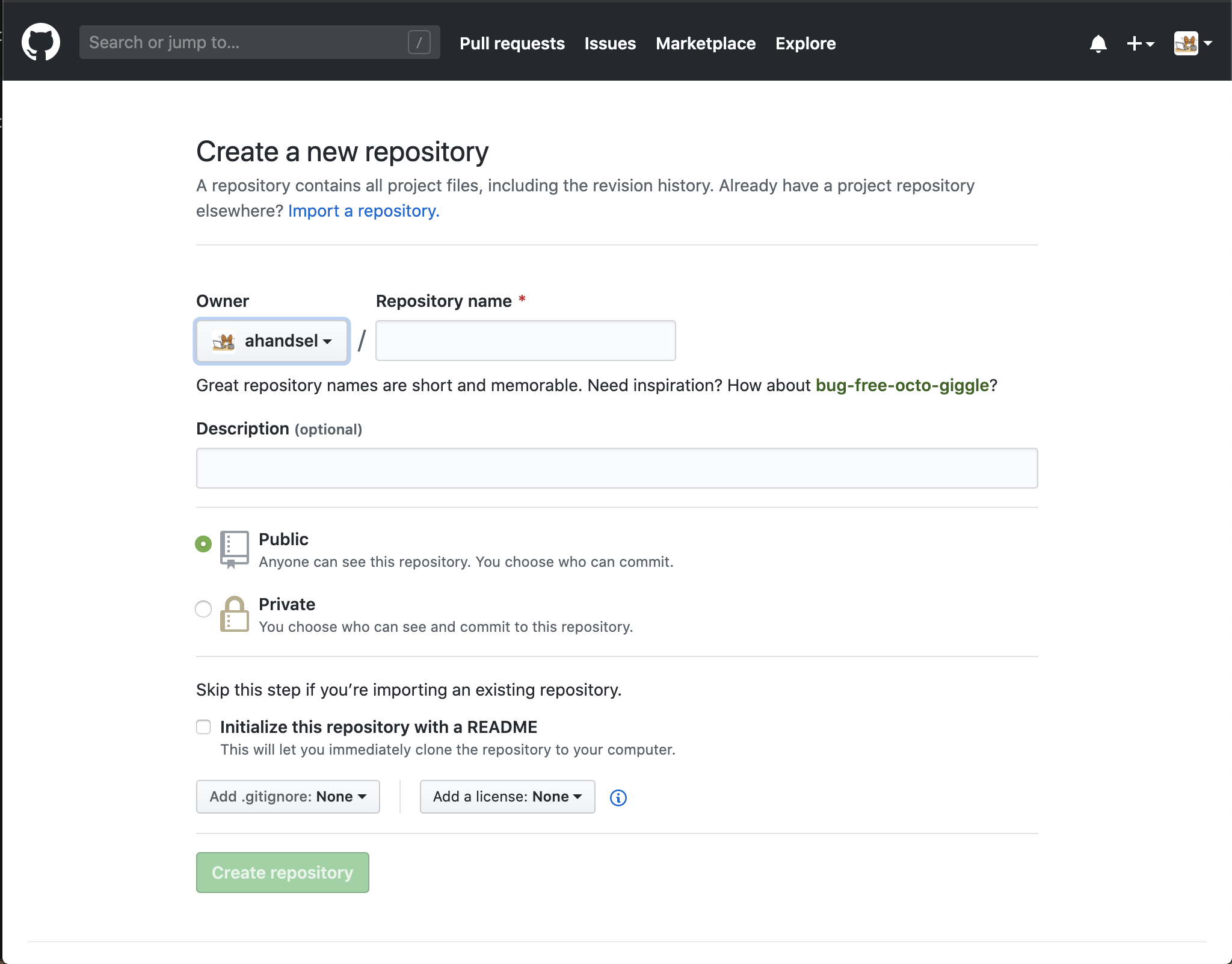
Create a repository
Create a repository named learning_git.
Leave the Initialize this repository with a README.md checkbox unchecked.
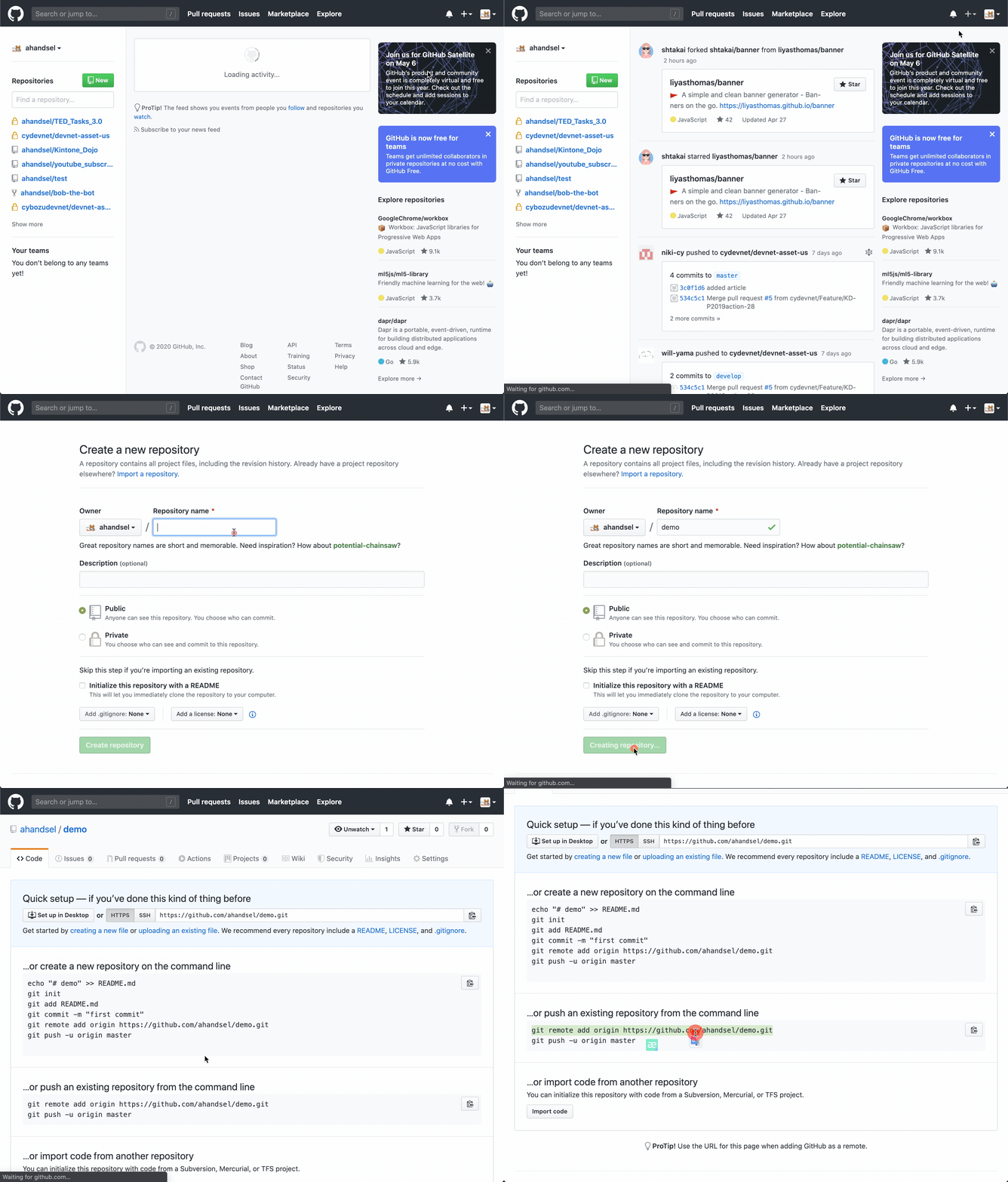
Local Git to GitHub
Let’s push the repository!
Click the Clone or download button on GitHub, then copy the HTTPS link to get the URL.
git remote add origin <link>
- Connects your local repository to the remote repository on GitHub.
git remoteis the command for managing remote repositories.- Git - git-remote Documentation
git remote add origin https://github.com/Your_GitHub_UserName/learning_git.git
git push -u origin main
Result from the terminal
Enumerating objects: 3, done.
Counting objects: 100% (3/3), done.
Delta compression using up to 4 threads
Compressing objects: 100% (2/2), done.
Writing objects: 100% (3/3), 298 bytes | 298.00 KiB/s, done.
Total 3 (delta 0), reused 0 (delta 0), pack-reused 0
remote: This repository moved. Please use the new location:
remote:   https://github.com/ahandsel/learning_git.git
To https://github.com/ahandsel/learning_git.git
 * [new branch]      main -> main
Branch 'main' set up to track remote branch 'main' from 'origin'.
Debugging
When you set up your first repository to sync between local and GitHub, you may run into login problems.
-
Remove the remote repository setting.
git remote remove origin - Create a new personal access token.
- github.com/settings/tokens/new
- Use the token instead of your GitHub password when you log in to your GitHub account from the terminal.
-
Try again.
git remote add origin https://github.com/Your_GitHub_UserName/learning_git.git git push -u origin main - Check the repository on GitHub.com to confirm the push worked.
https://github.com/Your_GitHub_UserName/learning_git.git
Documentation
- Managing remote repositories - GitHub Docs
- Git - git-remote Documentation
- Git - git-push Documentation
Hands-on A Complete
| Initialize Git | Set up GitHub | Create and push the local repository |
|---|---|---|
git init git remote add origin |
github.com/new | git status git commit -m |
Overview of Basic Git Commands
How Git Saves Changes
There are two commands that move items between spaces:
git add&git commit
There are three spaces where file and folder changes are saved:
working directorystaging arearepository
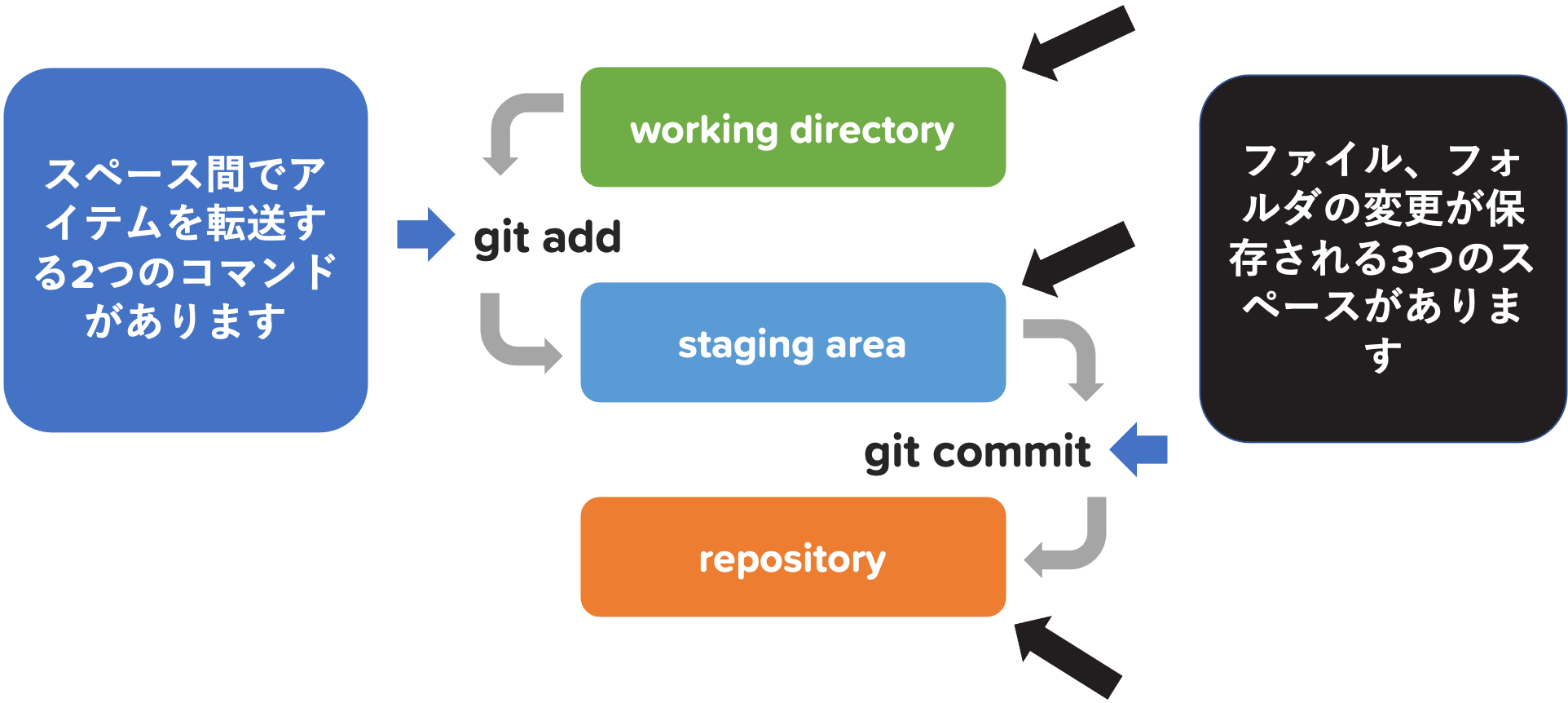
| [ working directory ✍️ ] | |
↘️ git add 📥 ↘️ |
|
| [ staging area 📂 ] | |
↘️ git commit 💾 ↘️ |
|
| [ repository 🗄️ ] | |
↘️ git push 🔄 ↘️ |
|
| [ remote repository (GitHub) 🌐 ] |
working directory, git add, staging area
| ➡️ | [ working directory ✍️ ] |
| ➡️ | ↘️ git add 📥 ↘️ |
| ➡️ | [ staging area 📂 ] |
↘️ git commit 💾 ↘️ |
|
| [ repository 🗄️ ] | |
↘️ git push 🔄 ↘️ |
|
| [ remote repository (GitHub) 🌐 ] |
working directory ✍️
- All changes are first made in the working directory.
git add 📩
- The command to add changes from the working directory to the staging area.
staging area 📂
- A buffer space between the working directory and the repository.
- It used to be called the “index”.
- It lets you add only certain changes and prepare them to be committed to the repository together.
Wait, a staging area? 🤔
- Staging a file = preparing the file for a commit.
Imagine you are making music 🎶
- You are writing songs that carry all kinds of messages.
- Everything from angry songs to love songs.
- Do you upload all the music at random?
- No, you make an album with a theme, right?
To make a romantic album 🎶
- You only
git addthe love songs. - Each chosen love song stays in the
Staging Areauntil you have added all of them. - Once every song you want in the album is in the
Staging Area, it is time to commit. - When you
git commit -m, you add the album title “Love Song” as the comment and commit.
git commit, repository, git push
| [ working directory ✍️ ] | |
↘️ git add 📥 ↘️ |
|
| [ staging area 📂 ] | |
| ➡️ | ↘️ git commit 💾 ↘️ |
| ➡️ | [ repository 🗄️ ] |
↘️ git push 🔄 ↘️ |
|
| [ remote repository (GitHub) 🌐 ] |
git commit 💾
- The command to record changes to the repository.
- Once the files you want to save are placed in the staging area, use the
git commitcommand. - Picture it like saving your game progress after you beat a boss.
- Leave a comment for each commit so you know what changes it records.
repository 🗄️
- A Git repository is managed in the
.gitfolder inside the project. - The repository can track the changes in your project.
What is Inside the Git Folder? 🤔
⚡ On Windows, use the dir command instead of ls.
$ pwd
/Users/UserName/Documents/learning_git

$ ls -la
total 8
drwxr-xr-x 4 UserName staff 128 Jun 9 14:54 .
drwx------@ 20 UserName staff 640 Jun 8 16:22 ..
drwxr-xr-x 12 UserName staff 384 Jun 9 14:56 .git
-rw-r--r-- 1 UserName staff 85 Jun 9 14:54 README.md

$ cd .git

$ ls -la
total 40
drwxr-xr-x 12 UserName staff 384 Jun 9 14:56 .
drwxr-xr-x 4 UserName staff 128 Jun 9 14:54 ..
-rw-r--r-- 1 UserName staff 20 Jun 9 14:54 COMMIT_EDITMSG
-rw-r--r-- 1 UserName staff 23 Jun 9 14:54 HEAD
-rw-r--r-- 1 UserName staff 316 Jun 9 14:56 config
-rw-r--r-- 1 UserName staff 73 Jun 9 14:54 description
drwxr-xr-x 14 UserName staff 448 Jun 9 14:54 hooks
-rw-r--r-- 1 UserName staff 137 Jun 9 14:54 index
drwxr-xr-x 3 UserName staff 96 Jun 9 14:54 info
drwxr-xr-x 4 UserName staff 128 Jun 9 14:54 logs
drwxr-xr-x 7 UserName staff 224 Jun 9 14:54 objects
drwxr-xr-x 5 UserName staff 160 Jun 9 14:56 refs
git push, remote repository
| [ working directory ✍️ ] | |
↘️ git add 📥 ↘️ |
|
| [ staging area 📂 ] | |
↘️ git commit 💾 ↘️ |
|
| [ repository 🗄️ ] | |
| ➡️ | ↘️ git push 🔄 ↘️ |
| ➡️ | [ remote repository (GitHub) 🌐 ] |
git push <remote> <branch> 🔄
- Local Repo → Remote Repo
- The command to upload your local repository to the remote repository.
- It exports your commits.
remote repository (GitHub) 🌐
- A repository on GitHub’s servers that lets other users see your code.
Working with Remote Repositories
git remote add origin <link>
- When you clone a remote repository to your local machine, Git creates an
alias. originis like a nickname for the remote repository’s URL.- The most common
aliasis calledorigin. -
The two commands below do exactly the same thing.
$ git push -u https://github.com/ahandsel/demo.git main$ git remote add ALIAS https://github.com/ahandsel/demo.git $ git push -u ALIAS main
git remote
- Manages the connections between your local and remote repositories.
git remote --verbose
-
Lists the URLs Git has stored, along with the aliases (nicknames) you can use to read from and write to that remote repository.
git remote --verboseorigin https://github.com/ahandsel/learning_git.git (fetch) origin https://github.com/ahandsel/learning_git.git (push)
Documentation
git push?
git push <remote> <branch> 🔄
-
Local Repo → Remote Repo exports your commits. - The counterpart to
git fetch.git fetchimports commits into your local repository.
- ⚠️ Note: pushing may overwrite changes.
The git push command only works against a remote repository that has not changed since your last push or clone.
- In other words, no one else has changed the remote repository.
- If you and another clone both push upstream ahead of you at the same time, that push is correctly rejected.
- You first have to fetch their work and include it in your push.
A Game Example - Animal Crossing
- Genji added a tent to the island.
- Genji uploaded the game status to GitHub.
- Piyo also added a house to the island.
- But before uploading to GitHub…
- Piyo needs to get the latest game status from GitHub.
- (because Genji added a tent)
Documentation
Hands-on A Review
Saving with Git
| Music 🎶 | |
|---|---|
| [ working directory ✍️ ] | Individual song |
↘️ git add 📥 ↘️ |
|
| [ staging area 📂 ] | Album |
↘️ git commit 💾 ↘️ |
|
| [ repository 🗄️ ] | Playlist |
↘️ git push 🔄 ↘️ |
|
| [ remote repository (GitHub) 🌐 ] | Spotify |
git remote
The command to manage the connections between your local and remote repositories.
git push
The command to upload your local repository to the remote repository.
Quiz Time
- How are Git and GitHub related?
- Hint: a
hubis the central point of an activity or network.
- Hint: a
- Which do you start with,
git addorgit commit?- Hint: to
commitis to promise to a specific action (such as marriage).
- Hint: to
- What is the
git pushcommand?- Hint: the
git pushcommand does the opposite of thegit fetchcommand.
- Hint: the
Answers
1. How is Git & GitHub related? * GitHub is the **hub** or the collection of everyone's Git * GitHub is a popular **remote repo** option 2. Which do you start with, `git add` or `git commit`? * First, use `git add` to gather the individual changes * Then, use `git commit` to bundle the changes 3. What is the `git push` command? * Use `git push` to upload the **commit** to the remote repo * Use `git fetch` to retrieve the latest version of the repoNext Section
Create & Merge Branches - 02_Branches_EN.md
List of Lecture Guides
README_EN.md ⚙️